
Secure Online Forms
Securing online forms against spam submissions is essential for maintaining the quality and reliability of your data. Unprotected forms are easy targets for automated bots that flood them with fake entries, irrelevant messages, or malicious links. This not only clutters your database but also makes it harder to identify genuine user interactions. Over time, spam can distort analytics, waste server resources, and disrupt workflows that rely on accurate submissions, such as customer inquiries, registrations, or lead generation. Implementing safeguards like CAPTCHA, validation rules, and spam filters ensures that only legitimate data reaches your system.
Equally important is enforcing strong passwords during user registrations to protect account security. Weak passwords make it easier for attackers to gain unauthorized access through brute-force or credential-stuffing attacks. Once compromised, user accounts can be misused for fraudulent activities, data theft, or further spreading spam. Encouraging or requiring strong passwords—combinations of letters, numbers, and special characters—adds a critical layer of defense. When combined with additional measures like email verification or multi-factor authentication, strong passwords help safeguard both user data and the integrity of your platform.
WordPress Forms Security
So, what can a WordPress site owner do to secure their online forms and keep user information safe from prying eyes? Well, the answer is RegistrationMagic. It is the fastest growing user registration plugin available for WordPress and offers exceptional WordPress forms security features to keep form submissions safe.
Here’s a quick look at the security features RegistrationMagic offers…
1. Google reCAPTCHA
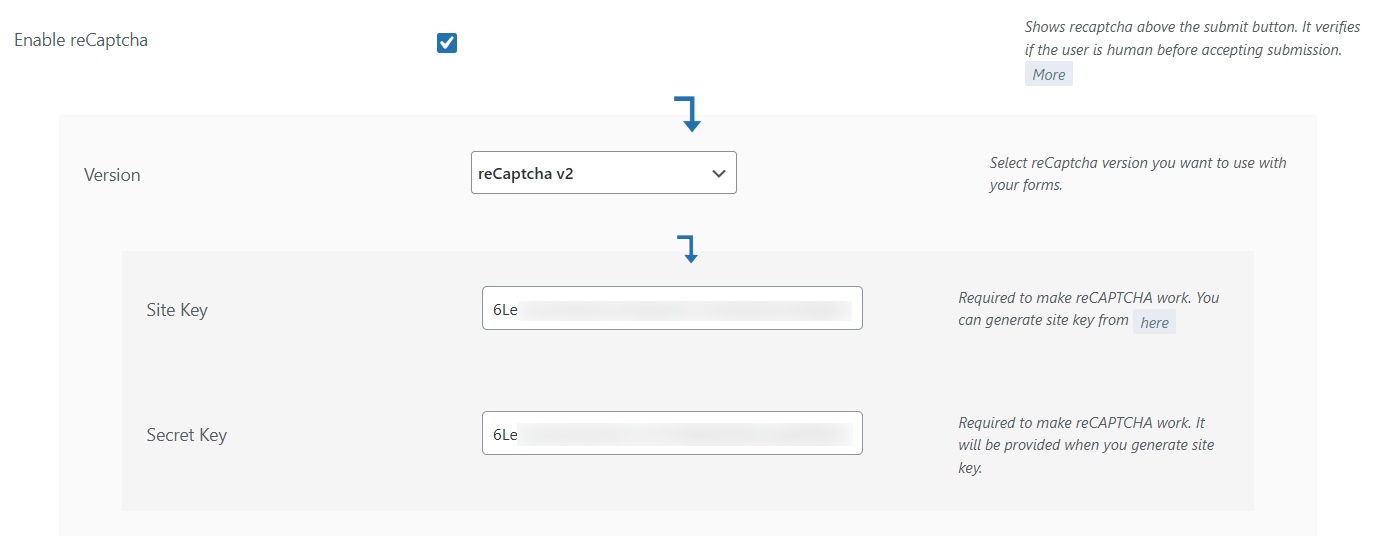
RegistrationMagic provides seamless integration of its online forms with Google’s reCAPTCHA user authentication check. reCAPTCHA for RegistrationMagic forms can be activated from RegistrationMagic’s Global Settings → Security settings.
All you need to do is enable the reCAPTCHA setting there and add your Site Key and Secret Key. Both of which can be obtained from Google’s reCAPTCHA Portal. Once activated, it’ll setup the reCAPTCHA authentication on all your RegistrationMagic forms.
2. CloudFlare Turnstile
If you do not want to use Google’s reCAPTCHA verification, RegistrationMagic also offers you a great alternative for it, which is CloudFlare’s Turnstile CAPTCHA. This is a RegistrationMagic Premium Addon. You can download it from here – https://registrationmagic.com/comparison/cloudflare-turnstile-addon/.
Once you have installed and activated it, you’ll see the options to configure Turnstile CAPTCHA in the security settings.
3. Form Submission Limit for a Device
Hackers are increasing employing brute force techniques to find flaws in a form’s security and exploit it. However, this is a trial and error method and requires plenty of failed attempts before any success is achieved.
RegistrationMagic halts such brute force attacks halfway by giving you the power to limit form submissions from a particular device. This means that if a hacker is trying to find security flaws in the website from the form, RegistrationMagic will stop any further submissions from his/her device. This will end the possibility of any further attacks from it.

4. Password Rules
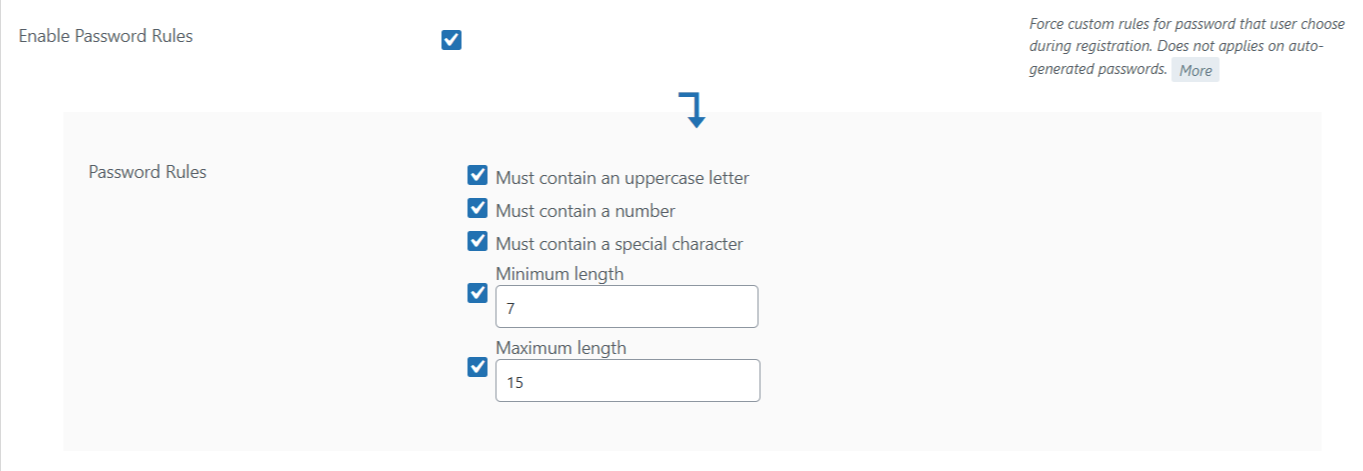
Enabling password rules is a highly effective way to make sure users registering from your form aren’t putting in weak passwords. Weak passwords can easily be targeted by hackers to gain access to your website and then wreak havoc once inside. Always ensure that user accounts on your website have limited access and are not using weak passwords.
Following are the key rules that passwords should follow to be considered strong…
- At least one uppercase letter
- At least one number
- Contain at least one special character
- Minimum length (should be at least 7 letters long)
- Maximum length (15 is a good max limit but the more the better)
5. Ban IP Addresses
If you received a lot of redundant form submissions from a particular IP address, it is always a good idea to ban that IP address from accessing the form again. You never know if those redundant form submissions were spam or someone just trying to break into your website. In most cases, it is the latter.

6. Ban Email Addresses
Similar to banning IP addresses, you can also ban email addresses from accessing the form too. To make the form stronger in resisting any possible attacks, use both the bans simultaneously.

7. Blacklisted/Reserved Usernames
Common usernames are easy pickings for hackers. Before getting to the password of a user account, a hacker has to determine the username of the account first. However, if someone is using common usernames like ‘admin’ or ‘company’, that person has done half of the hacker’s work then and there. The hacker now only has to determine the password for the account as the username is already on their list to go for first. So, always reserve common usernames from being used on your website.
Make use of RegistrationMagic and follow these simple WordPress forms security rules to secure online forms and to keep hackers away from your web forms for good.

- WordPress User Registration Analytics and Reports - March 24, 2026
- WordPress Forms Security Best Practices [Security Guide] - March 19, 2026
- How to Translate RegistrationMagic to your Language - March 19, 2026
- Match Form Design with WordPress Theme Automatically [Breakthrough Ideas] - July 22, 2024
- Version 6 Release Notice – Registration Form Front-end Revamp - July 10, 2024
- Submitting WordPress Registration Form Before Collecting Payment [Breakthrough Ideas] - June 18, 2022
- Boost RegistrationMagic Event Forms with EventPrime Integration - April 5, 2019
- 6 Reasons to Ditch Your Current WordPress Contact Form - June 24, 2018
- Best WordPress Registration Plugin – Top 5 Exclusive Features - June 17, 2018
- 7 Unique Ways to Setup WordPress New User Registration - March 7, 2018
What about the actual data that is collected? How is it encrypted?
The password remains in encrypted state for the front end users. We do not save the passwords but it is saved in WordPress tables. The information from the admin end like API keys, payment API integrations etc. are encrypted.